Download the ScreenWriter
Current Version: 1.1.0.1
Created by Erik Pistelli. This is a little freeware software which makes the writing of screenplays for TV and cinema extremely easy. It follows the standard American indentation rules and provides auto-completion for characters, places and day times. You can also export your scripts in various file formats. To use the ScreenWriter you need the .NET Framework 2.0. For more information: ntcore@gmail.com.
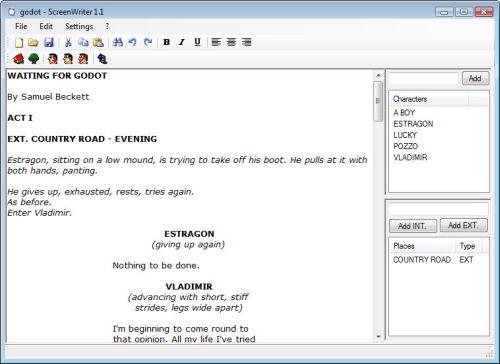
There are some test scripts in the installation directory of the program. You can open those ones to see a preview of a formatted script.
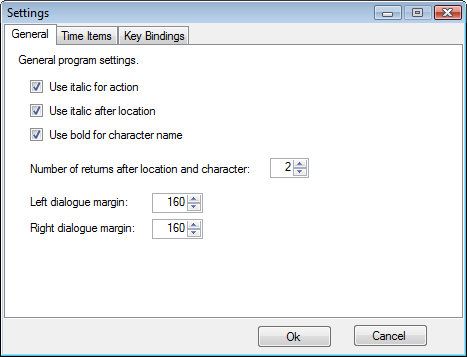
You can change the formatting rules to your own preferences through the settings. Customizable is the use of bold and italic for locations and characters, for instance. Or maybe you want to change the margins indenting. Or the number of returns after a character or a location.
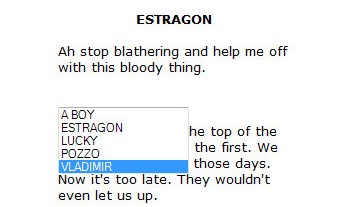
The auto-completion is very easy to use and saves a lot of time to the writer. You can either double click on a name in the boxes on the side to make them appear in the text or use the auto-completion box, which appears using a specific key combination for characters and locations.
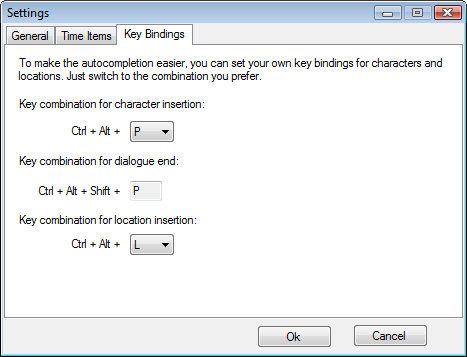
You can change the default key combinations in the settings in order to create an ideal combination for your keyboard type and your way of writing.
It is possible to add notes to any character and location in the lists just by right-clicking on the item and then on “Edit”.
The ScreenWriter offers not only an auto-completion for internal and external locations, but also an auto-completion for the day times following the locations.
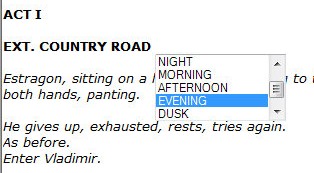
You can change the default day time items from the settings in order to have your own. This is very useful in case you’re not writing in English your script. Your personal day times will be automatically saved in your current script project.
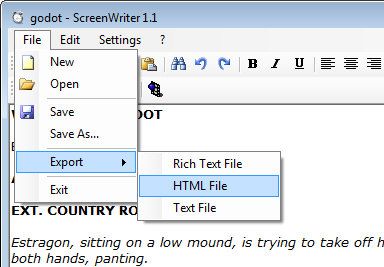
Also, as mentioned earlier, you can export your script in various kind of file formats. The best one is the rtf one, because it won’t lose anything of the original formatting of your script.
Features:
- Projects Interface
- Customizable formatting rules
- Auto-completion for characters, locations and day times
- Customizable day times
- Editable notes for characters and locations
- Script export in various file formats (rtf, html, txt)